In March 2026, The Metropolitan Museum of Art did something great. They published high-resolution 3D scans of about 140 objects from their collection. Sculptures, reliefs, architectural fragments, even a chess piece or two. All of it released under the same Open Access program that already covers hundreds of thousands of their images. The scans are CC0. You can download them, remix them, and yes, 3D print them at home for free.
The catch is that there's no download button. The models live inside an interactive viewer on each object's page, and getting from spinning marble on my screen to an STL in my slicer took some digging. This article is the result of that digging. Every model below is interactive (drag to orbit, scroll to zoom), every one links back to its page at The Met, and by the end you'll know how to do this yourself for any object in the program, all without stepping outside what CC0 allows.
Three Objects, Ready to Spin
Three favorites from the objects I've pulled down and printed so far. Each viewer loads the actual scan you'd print. Tap a work of art to load it (they're 3-8 MB each).
View at The Met ↗
View at The Met ↗
View at The Met ↗
What CC0 Actually Means (And How to Be a Good Citizen)
The Met applies Creative Commons Zero to artworks it believes are in the public domain. CC0 is the most permissive designation there is: the museum waives all copyright, so you can copy, modify, distribute, and even sell what you make. No permission needed, no attribution required.
"No attribution required" isn't the same as "no attribution appreciated," though. A few habits keep this ecosystem healthy:
- Verify the designation. Every object page shows a "Public Domain" badge when CC0 applies, and the Met's Open Access CSV on GitHub has an
Is Public Domaincolumn covering the whole collection. Check before you redistribute. - Credit anyway. "Scan courtesy of The Metropolitan Museum of Art, CC0" costs you one line and helps the next person find the source.
- Link back. Deeplink the object page (like the captions above) so people can read the real art history, not just download a mesh.
- Don't imply endorsement. CC0 lets you use the work; it doesn't let you suggest The Met sponsors your Etsy shop.
- Be gentle with their servers. The files are served openly, but they're museum infrastructure, not a CDN for your build pipeline. Download once, keep local copies.
Using Claude Code? Skip every step below.
I packaged this whole workflow as a Claude Code skill. It finds the scan, downloads every format, and hands you a print-ready STL.
Unzip it into your skills folder and ask for any object by name or URL:
# Install
unzip met-skill.zip -d ~/.claude/skills/

# Then, in any Claude Code session
/met https://www.metmuseum.org/art/collection/search/204812
The skill walks Claude through the same process documented below, including the one-time Python environment setup, so you can also just read on and do it by hand.
Step 1: Find an Object With a 3D Scan
Only objects with a "View in 3D" button on their collection page have scans. That's roughly 140 as of this writing. The Met announced the program in its March 2026 press release, and browsing the collection at metmuseum.org/art/collection with an eye out for that button is the most reliable way to spot them.
One thing that tripped me up: the GitHub Open Access repository is metadata only. The 480,000-row CSV tells you an object's title, accession number, and public-domain status, but contains no 3D links at all. It's great for confirming CC0 status, but it won't help you find the models.
Step 2: Get the Files
Each "View in 3D" button opens a viewer made by VNTANA, a 3D-asset platform The Met uses to host the scans. Behind the viewer, every object has three downloadable formats: GLB (the web standard), USDZ (Apple's AR format, which works directly in AR Quick Look on an iPhone), and FBX. No login, no API key.
The no-code way: open the object page, click View in 3D, open your browser's developer tools, and watch the Network tab with a filter of glb. The model file appears as soon as the viewer loads. Right-click, open in a new tab, saved.
The repeatable way: the viewer's URLs follow a clean pattern. Every object page embeds a product UUID (visible in the page source as vntanaAssets, or in the viewer iframe's productUuid parameter), and from there:
# Product metadata - lists every available format
https://api.vntana.com/products/<productUuid>/organizations/The-Metropolitan-Museum-of-Art/clients/masters

# Each model file, using modelBlobId values from that JSON
https://api.vntana.com/assets/products/<productUuid>/organizations/The-Metropolitan-Museum-of-Art/clients/masters/<modelBlobId>
The product JSON's response.asset.models array holds a modelBlobId per format (.glb, .usdz, .fbx). Two requests and you have everything.
Step 3: Convert to STL
Your slicer wants an STL (or 3MF), and the GLB has one quirk that breaks the obvious conversion paths: the mesh is compressed with Draco, and most lightweight converters silently fail on it. You get a file full of zeroed geometry that looks fine until you open it.
The easy way is Blender, which decodes Draco natively:
1. File → Import → glTF 2.0 → pick the .glb
2. File → Export → STL
   ✓ tick "Selection Only" if you imported extra nodes
If you're automating (I built a small pipeline so I could pull several objects at once), decode the Draco buffers directly with Python. DracoPy handles the decompression that trips up trimesh and gltf-pipeline:
import DracoPy, trimesh, numpy as np

# for each primitive in the GLB whose extension is
# KHR_draco_mesh_compression, decode its bufferView:
dm = DracoPy.decode(draco_bytes)
verts = np.asarray(dm.points).reshape(-1, 3)
faces = np.asarray(dm.faces).reshape(-1, 3)

mesh = trimesh.Trimesh(vertices=verts, faces=faces)
mesh.merge_vertices()
# glTF is Y-up; slicers are Z-up
mesh.apply_transform(
    trimesh.transformations.rotation_matrix(np.pi/2, [1, 0, 0]))
mesh.export("object.stl")
Step 4: Print It
Three things to know before you slice:
- Check your units. The scans are inconsistent: some are modeled in meters (the glTF standard), others in centimeters. Since slicers read STL units as millimeters, a meters-based scan imports microscopically small and a centimeters-based one imports at a convenient 1:10. Scale by 1000× or 10× respectively, then set your final print size from there. The real-world dimensions on each object's Met page are your ground truth.
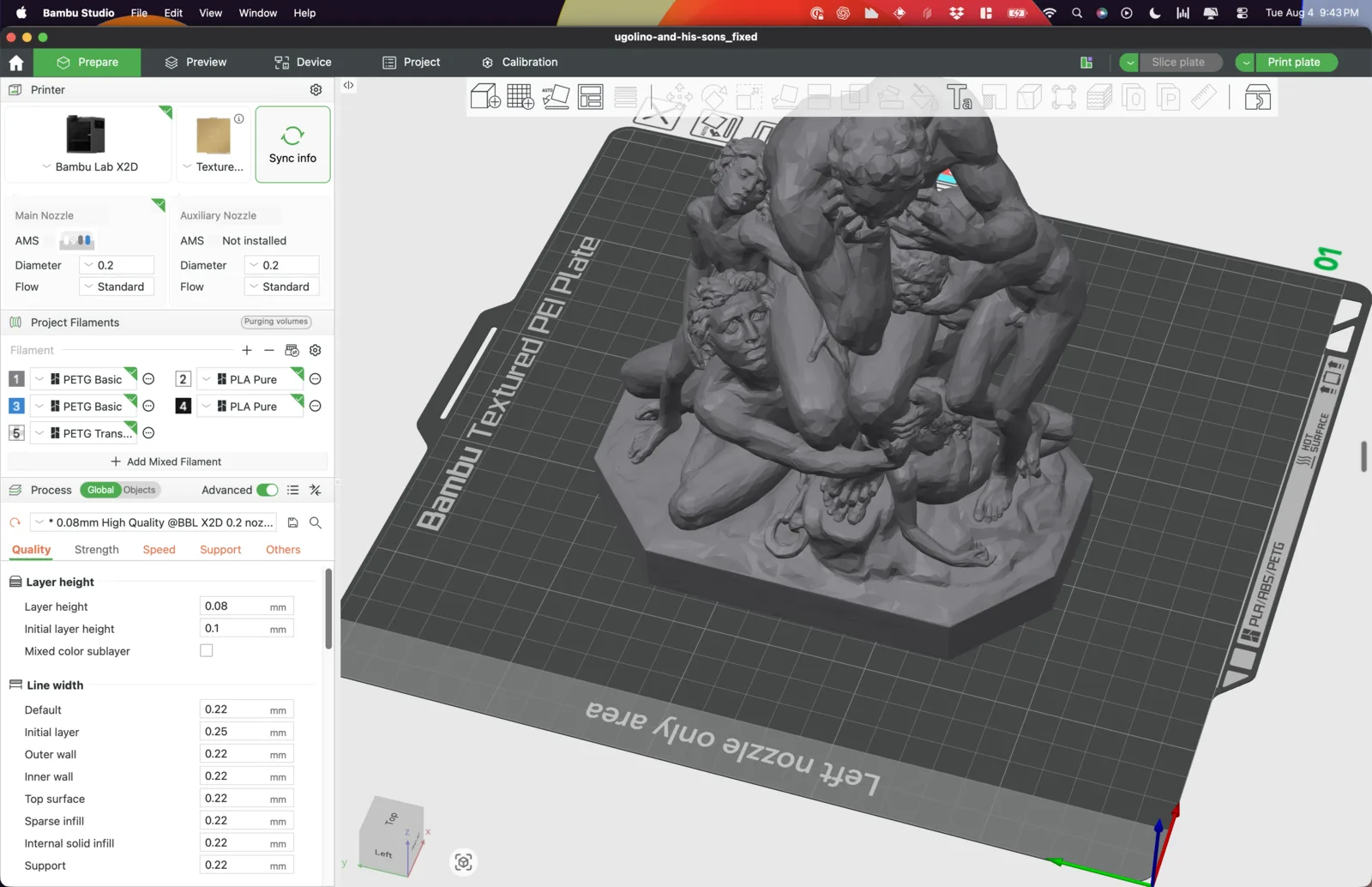
- Expect non-watertight meshes. These are photogrammetry scans, usually delivered as several mesh shells with small gaps. Some slicers quietly repair this on import, but don't be surprised if yours flags an error instead. Bambu Studio marked my STL as broken and linked me to Formware's free online STL repair tool. I uploaded the file, it repaired it in seconds, and the fixed version sliced without a complaint. Of the six objects I've pulled down, only the elephant was sealed out of the box.
- Mind the geometry. The scans are around 100k triangles, which is plenty of detail for FDM at desk-statue size. Flat reliefs (the spandrel, lintel, and Agnus Dei I also pulled down) convert already lying flat, which is exactly how you want to print them: relief up, no supports. Figurative sculpture like Ugolino needs tree supports and patience.
If you want to create an original character instead of starting with a museum scan, 3D Printing From 2D AI Outputs follows my plnty.app reference images through a Higgsfield/Meshy GLB, a manual Blender STL export, and pocket-sized PLA prints. It includes the failed attempts and the reusable generation skill.
Why This Matters
Museums releasing their collections under CC0 is a big deal. A sculpture that 5 million people a year can visit in Gallery 548 is now something anyone can spin around in a browser and print at home overnight. The Met deserves real credit for making the scans open instead of locking them behind a store.
Download something, print it, and put a 900-year-old Catalan arch fragment on your bookshelf. When someone asks where you got it, send them to The Met.
Stay tuned...
This guide is getting a live test. Ugolino and His Sons is on the printer as I write this. Here's where things stand: